
The Denver Post
MediaNews GroupNews & Magazines
2.2815.00 Reviews
- Version
- 10.0.60
- Installs
- 100.00K
- Age Rating
- Everyone 10+
Screenshots


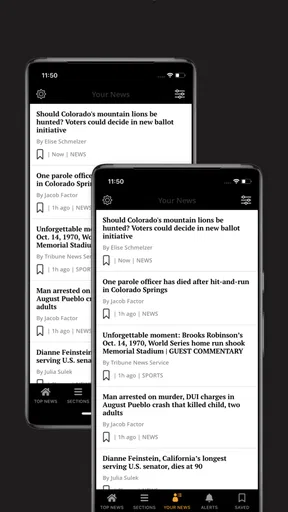

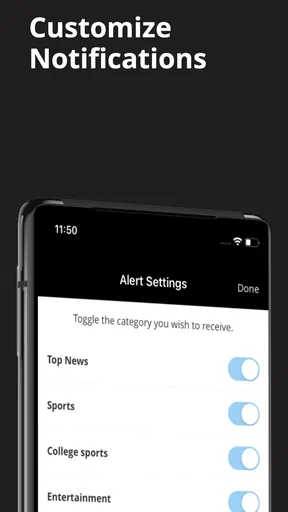



Our Review of The Denver Post
 Analysis by Appyee
I keep coming back to The Denver Post for one main reason: it puts local news and Denver sports in the same place without making me jump between several unrelated apps. That focus sounds simple, but it changes how useful the app feels during a busy day. I can check a developing local story, look for Broncos or Avalanche coverage, glance at Nuggets and Rockies news, and then move to weather without rebuilding my reading routine each time.
My experience is best described as practical rather than polished. This is a free news and magazine app from MediaNews Group, aimed at readers who want Denver-focused coverage on a phone. It is not trying to replace every national news source, and I would not use it as my only way to follow major events outside Colorado. Its value is narrower: it brings a regional news habit into a single mobile destination.
That narrow purpose also explains the mixed impression left by its store reputation. The app has an average rating of 2.2 from around 1.3 thousand ratings, while its reach has passed 100 thousand installs. I read that combination as a warning to test the app for yourself rather than assuming its audience size means a smooth experience. The content focus may suit you very well, but the app experience can matter just as much as the headlines.
Local coverage works best when it becomes a daily habit
I find that local coverage becomes more useful when I give it a regular place in my day, rather than opening it only when a headline catches my eye. In the next section, I look at how a few purposeful check-ins can make Denver news, sports, and weather easier to fit around everyday plans.
The capability that matters most
The strongest capability here is the combination of breaking news, Denver team coverage, and weather in one focused feed. In practice, that means the app can serve several small information needs throughout the day instead of being reserved for one long reading session. I might open it in the morning for the forecast, return after work for a local development, and check sports coverage later without changing apps.
That workflow is more useful than the short store summary suggests because the subjects naturally overlap. A weather update can affect a commute, an event, or a game-day plan. A local story may be more relevant to me than a national headline that happens to be receiving more attention elsewhere. Keeping those subjects together makes the app feel like a regional bulletin rather than a general news reader with a Denver label.
I also like that the sports emphasis is broad enough to cover the Broncos, Avalanche, Nuggets, and Rockies. A reader who follows only one team may prefer a dedicated team app for deeper specialization, but someone who follows Denver sports across seasons gets a more balanced starting point. The app is particularly convenient during a day when interest shifts quickly from football to hockey, basketball, or baseball.
The real benefit is context switching with less friction. I do not have to remember which source handles local reporting, which one handles a particular team, and which one I use for weather. That does not guarantee that every story will be the best available version, but it does make the first check faster and more consistent.
What using it feels like in ordinary situations
Imagine a weekday morning before leaving home. I open the app to see whether weather could change my route, then scan local headlines for anything likely to affect the day. Later, while waiting for an appointment, I can look at sports coverage without opening a separate service. In the evening, I may return for a fuller article rather than relying only on a headline.
This is where the app makes the most sense: repeated short visits. I would not judge it solely by whether it replaces a long-form newspaper website on a tablet. Its better role is as a quick checkpoint that I can revisit when I want a Denver-specific update. If I already have a strong browser routine, the app needs to save enough time to justify its place on my phone.
One useful habit is to treat the weather section as a planning trigger rather than just a forecast screen. I check it before deciding whether to attend an outdoor activity, travel across the metro area, or leave extra time for a difficult commute. Then I can move directly into local reporting or sports news. That small sequence gives the app a purpose beyond passive scrolling.
I also found it helpful to separate “check now” reading from “read later” reading in my own routine. A quick scan tells me whether anything requires attention. If a story looks important, I give it a proper reading when I have time. This prevents the app from becoming a stream of half-read headlines and makes its local focus more manageable during busy periods.
Where the app fits beside familiar alternatives
The usual alternative is a mobile browser pointed at a newspaper site. A browser gives me flexibility and may be better when I want to compare several publications, search broadly, or read national coverage beside local reporting. The dedicated app is more convenient when I want the same Denver-centered destination repeatedly, because I do not need to recreate that starting point each time.
A second alternative is a general news aggregator. Aggregators are stronger for breadth and for combining stories from many publishers, but their local coverage can feel inconsistent. They may surface a national angle before a neighborhood-level report, while this app begins with the regional subjects I am most likely to seek intentionally.
Dedicated sports apps have the opposite advantage. They are usually the better choice when I need detailed team-specific information, live game tools, or a highly specialized sports experience. The Denver Post app is more useful when sports are one part of a wider local-news routine. Its strength is the combination, not necessarily maximum depth in one team category.
Weather-only apps can also be more suitable when forecast detail is the priority. I would choose one of those for advanced weather planning, repeated alerts, or a forecast-centered workflow. Here, weather works best as one part of a broader Denver information check, not as the sole reason to install the app.
The tradeoff between convenience and depth
The app’s focused scope is both its advantage and its limitation. If Denver news, the four named major teams, and weather are central to your day, the compact range keeps the experience relevant. If you want international reporting, extensive business coverage, or news from several cities, you will quickly need another source.
I also would not confuse a convenient entry point with a complete news diet. A headline feed can help me notice what deserves attention, but important stories often need comparison and fuller context. For major civic issues or events with consequences beyond Denver, I prefer checking more than one source before forming an opinion. This app can start that process, but it should not automatically finish it.
The store’s rating is another reason I would approach installation with realistic expectations. A 2.2 average indicates that many users have encountered enough friction to rate the experience poorly, even though the app has more than 100 thousand installs. I cannot treat that rating as proof that every phone will behave the same way, but I would pay attention to loading speed, navigation, and how comfortably the app fits my reading habits during the first few sessions.
There is also a subscription-related consideration. The app is free to install, but in-app purchases range from $14.99 to $174.99 per item. That makes it important to understand what reading access and purchase prompts mean for your own use before committing money. A casual reader may be satisfied with free access, while a regular newspaper reader should decide whether the paid path offers enough value for the amount of time spent inside the app.
For families, the content rating is Everyone 10+. I would still use ordinary judgment when handing the phone to a younger reader, since news can include upsetting or mature real-world subjects even when an app’s age classification is relatively broad. The rating is useful as a general guide, not a substitute for deciding what a particular child should read.
Small workflow choices that improve the experience
My first tip is to open the app with a question instead of scrolling without a goal. “What affects my day?” works in the morning; “What changed locally?” works after work; “What happened with Denver sports?” works in the evening. This keeps the mixed feed from feeling unfocused and makes the app’s several coverage areas work together.
My second tip is to use the app as a first-pass filter. Read enough to identify the stories that matter, then slow down for those stories. This is especially helpful when the news cycle is busy, because local and sports headlines can compete for attention. The app becomes more useful when I decide what deserves time rather than treating every item as equally urgent.
A third trade-off is worth making explicit: convenience can encourage repetition. Because the same app covers weather, local news, and sports, it is easy to check it frequently without noticing how much time is going into headline refreshes. I get better value when I set natural check-in points around my day instead of opening it every few minutes.
Finally, I would keep a browser or another trusted source available for verification and broader context. That is not a criticism unique to this app; it is a sensible habit for any single-publication news tool. The Denver Post is strongest at helping me notice and follow Denver-centered topics, while comparison sources help me understand how those topics fit into a larger picture.
Who will get the most from it
I think this app is best for Denver-area readers who want one recurring place for local headlines, weather, and coverage of the Broncos, Avalanche, Nuggets, and Rockies. It also suits people who prefer short mobile check-ins instead of opening a full newspaper site every time they want an update. The free entry point makes it easy to test that routine before deciding whether paid options are worthwhile.
It is less suitable for someone who wants a national or international news hub, a specialized weather instrument, or a deep single-team sports companion. In those cases, a browser-based mix, an aggregator, a weather-focused app, or a dedicated sports service may be better. I would also skip it if the low average rating reflects the kind of interface frustration I personally cannot tolerate, especially when I already have a fast alternative workflow.
Compatibility is fairly approachable for older devices because the app requires Android 8.0 or later. Its current version is 10.0.60, and the long-running release history reaches back to October 22, 2010. I see that as evidence of an established product rather than a brand-new experiment, but longevity alone does not guarantee that the current interface will feel modern on every phone.
My final view is cautiously positive. I like the editorial focus and the way the app turns local news, Denver sports, and weather into one repeatable habit. That is a genuine convenience, especially for readers who want a regional check-in several times a day. At the same time, the rating, the paid purchase range, and the limited geographic scope mean I would not recommend it blindly.
If your daily questions are mostly “what is happening around Denver, what is the weather doing, and what is the latest with the local teams?”, this app has a clear reason to exist. I would install it, test the reading flow, and keep it only if it makes those checks easier than my browser or current news mix. For that specific audience, The Denver Post can be a useful local companion; for everyone else, its narrow focus is likely to feel more limiting than helpful.
Verdict
Strengths of The Denver Post
- Fast access to breaking news and local Denver coverage
- Clear sections for sports, politics, business, and entertainment
- Personalized alerts help you follow important developing stories
- Articles include useful photos, videos, and local context
- Digital subscription offers convenient access across mobile devices
Limitations of The Denver Post
- Many full articles may require a paid subscription
- Some content can load slowly on weaker mobile connections
- Frequent notifications may feel excessive for casual readers
- Advertising can reduce the amount of visible screen space
- Coverage is highly focused on Denver and nearby Colorado communities
Similar Picks in This Category
View All
Google News - Daily Headlines
Google LLC4.0

X
X Corp.4.8

Flipboard:Your Social Magazine
Flipboard3.4

Opera News: breaking & local
Opera4.5

Hindi News by Dainik Bhaskar
Dainik Bhaskar Group4.0

Way2News Daily News App
Way2News ( Formerly Way2SMS )4.6
Frequently Asked Questions
What is The Denver Post app?
The Denver Post app is a mobile news platform for reading reporting from Denver, Colorado, and communities across the state. It typically provides access to breaking news, politics, business, sports, entertainment, lifestyle stories, opinion pieces, photos, and other local coverage. The layout is designed for browsing headlines quickly, opening full articles, and following developing stories from a phone or tablet.
Is The Denver Post app free to download and use?
The app can generally be downloaded without paying an installation fee, but access to all articles may require a digital subscription or an active newspaper subscription. Some headlines and stories may be available for free, while frequent readers can encounter a subscription limit or paywall. Before downloading, check the current terms, pricing, and available trial options in the app store or on The Denver Post’s official website.
What content can I read in The Denver Post app?
The app focuses on news relevant to the Denver area and Colorado, including local government, crime, education, transportation, weather, sports, arts, restaurants, and community events. It may also include national and international stories selected for local readers. Coverage can change throughout the day, so the app is most useful for users who want a combination of breaking updates and in-depth regional journalism.
Does The Denver Post app send breaking-news notifications?
The Denver Post app may support notifications for breaking news, major local developments, sports updates, and other important stories. Notification categories and availability can vary according to the app version and device settings. After installation, review the notification preferences rather than enabling everything automatically. This allows you to receive urgent updates without being overwhelmed by alerts for every newly published article.
Can I save articles or read The Denver Post offline?
Features such as saving articles, accessing editions, or reading content offline may depend on the current app version and your subscription level. Some newspaper apps offer limited offline access after content has loaded, while others require an internet connection for most articles. If offline reading is important to you, check the app’s latest feature description and test the behavior after signing in before relying on it during travel.
